

Create Stunning Voiceovers Fast with Lets Vocal AI Voice Generator
19 Aralık 2025Table of Contents
- The Ultimate Guide to Text to Voice for Modern Creators
- Why Text to Voice Generators are a Secret Weapon
- Speed and Efficiency
- Easy Content Repurposing
- Cost Savings
- Improved Accessibility
- What Matters When Choosing a Generator
- Why Creators Choose LetsVocal
- Simple Workflow for Content Creators
- Practical Tips to Make AI Voices Sound Natural
- Step-by-Step Example: Producing a 60-Second Voiceover
- SEO and Distribution Tips
- Pricing Plans for Every Workflow
- Frequently Asked Questions
- Can I use LetsVocal audio in monetized videos?
- How fast can I get audio from text?
- What control do I have over the voice?
- Final Thoughts
The Ultimate Guide to Text to Voice for Modern Creators
If you create content like YouTube videos, short-form clips, or podcasts, you know how much time voice recording consumes. Text to voice generators accelerate production, improve consistency, and let you repurpose content across different formats. In this guide, you will find:
- Clear, actionable steps for integrating AI voice into your workflow.
- A creator-focused checklist for evaluating tools.
- A practical walkthrough to produce a polished voiceover with LetsVocal.
Why Text to Voice Generators are a Secret Weapon
Modern AI voice tools help creators solve practical problems fast. Here is what they unlock for your channel or brand:
Speed and Efficiency
Generate a complete narration in seconds and iterate instantly. There are no re-takes, no microphone setup time, and no background noise issues.
Easy Content Repurposing
Turn one script into a video voiceover, a podcast episode, and blog audio without ever needing to step back into a booth.
Cost Savings
Save on studio time or recurring voice actor fees, which is especially important when you are producing content at scale.
Improved Accessibility
Provide audio versions for visually impaired users and extend your reach to audio-first audiences who prefer listening over reading.
What Matters When Choosing a Generator
Use this checklist when comparing tools:
- Naturalness: Does the voice sound like a real person? Are the pauses and emphasis realistic?
- Customization: Can you pick different voices and tweak the pitch or speed to match your brand?
- Export Options: Easy MP3 or WAV downloads speed up your publishing workflow.
- Predictable Pricing: Look for creator-friendly plans that make scaling your content sustainable.
- Reliability: Quick pronunciation fixes and responsive support reduce friction during production.
Why Creators Choose LetsVocal
LetsVocal focuses on the features creators actually care about. Here are the core capabilities we provide:
- Realistic AI Voices: Generate ultra-realistic, human-sounding voices for videos, apps, and presentations.
- Built for Social Media: Ideal for YouTube, TikTok, Instagram, and podcast creators needing high-quality voiceovers.
- Custom Controls: Fine-tune pitch and speed to match your specific content style and tone.
- Instant Audio: Turn your text into downloadable clips in seconds with no technical skills needed.
- High Performance: Our engine handles long-form scripts just as easily as quick social media hooks.
Simple Workflow for Content Creators
- Paste or type your script into LetsVocal.
- Choose a voice and adjust the pitch or speed.
- Generate a sample, iterate, then export your MP3 or WAV file.
- Import the file into your video editor or podcast tool and publish.
 LetsVocal
Give Your Content a Professional Voice with AI
Generate realistic, human-like voiceovers in seconds. Support for 40+ languages with studio-quality clarity for your videos, ads, and presentations.
Practical Tips to Make AI Voices Sound Natural
Small script and production changes make a big difference in the final result:
- Write conversationally: Use contractions and short sentences to mimic how people actually talk.
- Use punctuation for timing: Commas and periods help create natural pauses.
- Try parenthetical cues: Short instructions like (pause) can help guide the tone.
- Test multiple voices: Different voices change the perceived personality and engagement of your video.
- Layer music carefully: Apply audio ducking so the narration remains clear over your background track.
- Optimize for your platform: Use punchy lines for shorts and a smoother, more relaxed cadence for podcasts.
Step-by-Step Example: Producing a 60-Second Voiceover
- Draft your script: Keep it under 150 to 200 words for optimal pacing in a one-minute clip.
- Refine for speech: Break up long sentences and add commas where a speaker would naturally take a breath.
- Choose your voice: Preview different options and pick the one that matches your channel tone.
- Tweak the controls: Adjust the pitch and speed until the sample feels exactly right.
- Generate and export: Download the MP3 and bring it into your editor with your background music.
This workflow reduces the time spent recording and editing from hours to just a few minutes of clicking.
SEO and Distribution Tips
- Embed audio on your blog: This improves dwell time and makes your content more accessible.
- Publish to podcast platforms: Reach listeners on Spotify or Apple Podcasts who prefer audio-only content.
- Transcribe your audio: Repurpose those transcripts into SEO-optimized posts and social media captions.
- A/B test your voices: Small changes in tone can affect your watch time and audience engagement.
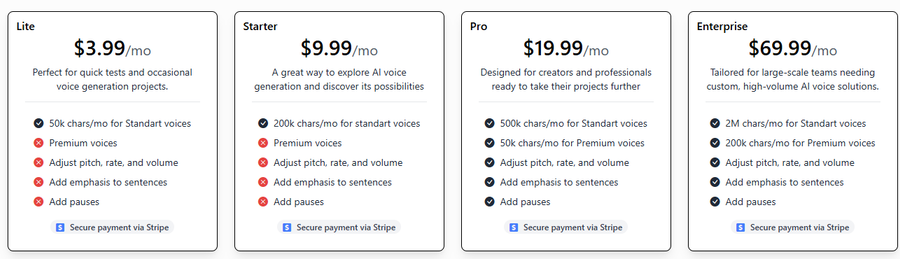
Pricing Plans for Every Workflow
LetsVocal offers flexible options for everyone from hobbyists to professional production teams.
Frequently Asked Questions
Can I use LetsVocal audio in monetized videos?
Yes. Our plans include clear commercial usage rights so creators can monetize their work on platforms like YouTube and TikTok.
How fast can I get audio from text?
The process is almost instant. You can generate downloadable clips in seconds and export them directly to your favorite editor.
What control do I have over the voice?
You have full control over pitch and speed, allowing you to tailor the voice to your specific brand or the mood of your content.
Final Thoughts
LetsVocal makes it possible to focus on your story and distribution while the technical side of voice recording is handled professionally. Whether you publish daily shorts, weekly videos, or serialized podcasts, this tool is built for creators who want speed without sacrificing quality.
LetsVocal
Give Your Content a Professional Voice with AI
Generate realistic, human-like voiceovers in seconds. Support for 40+ languages with studio-quality clarity for your videos, ads, and presentations.